5.17.2 IBuffer Usage 
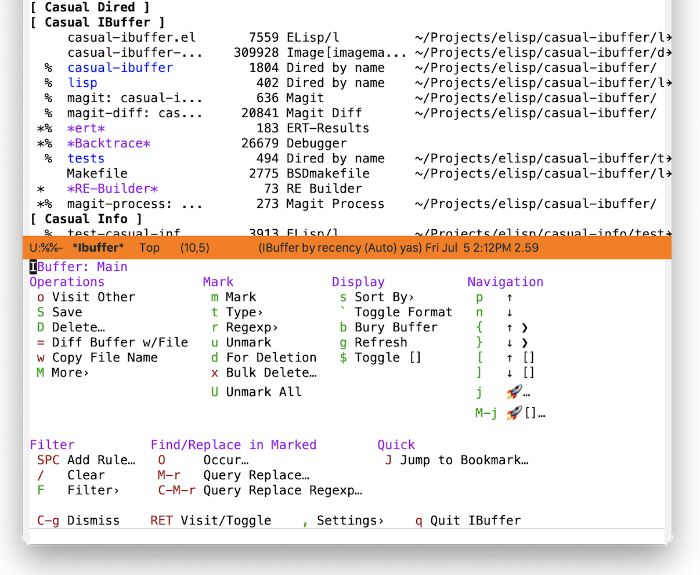
The main menu of Casual IBuffer (casual-ibuffer-tmenu) is organized into the following sections:
- Operations
Commands to operate either on the buffer at point or on marked buffers.
- Mark
Commands to support the marking of buffers.
- Display
Commands to control the display of buffers. Buffers can be sorted by different criteria.
- Navigation
Commands to navigate the buffer list.
- Filter
Commands related to filtering/organizing buffers. Support for defining Filter Groups is provided here.
- I-Search/Occur Marked
I-Search and Occur commands for marked buffers are here. Note that while you are in an I-Search session, the Transient menu for I-Search is available to you.
- Query Replace Marked
Commands to search & replace text in marked buffers are provided here. Note that commands in this section that modify buffers do not save said buffers.
Note that the menu item “RET” has “do what I mean” (DWIM) behavior. If the point is currently on a filter group (described below) then pressing the RET key will toggle the visibility of items matching that filter group. Otherwise, it will visit (open) the buffer.
As with other Casual user interfaces, the ability to jump to a bookmark is available.
The sections below detail further the features of IBuffer.