5.11.2.3 Window Management 
The menu casual-editkit-windows-tmenu provides support for different Emacs window management commands. Note that in Emacs, a window ((elisp)Basic Windows) is defined differently than its usage in contemporary graphical user interfaces.
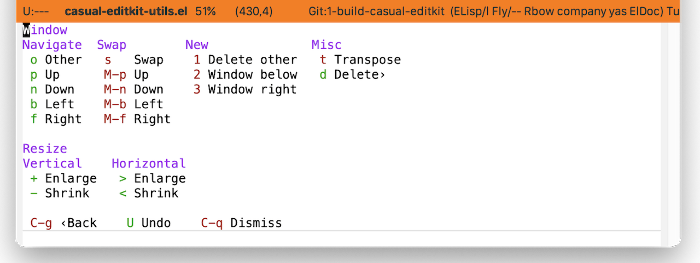
Users wishing more direct access to this menu can bind casual-editkit-windows-tmenu as shown in the install section.
This menu is context sensitive in interrogating the layout of windows in a frame with respect to the current window. Only valid menu commands will be displayed given the context.
If Casual v3.1+ is installed on GNU Emacs 31.1+, support for changing window layouts is provided in the Layout section (elisp#Changing Window Layouts). As of Casual v3.1, the “(t) Transpose” menu item uses the built-in window-layout-transpose command and obsoletes usage of the 3rd party transpose-frame package.
The organization of the menu divided into the following sections:
- Focus
Window focus commands.
- Swap
Swap window commands.
- Split
Window split commands.
- Layout
Window layout commands (only Emacs 31.1+)
- Horizontal
Resize window horizontally.
- Vertical
Resize window vertically.
- Delete
Delete window commands.
Window Deletion 
This menu provides support for deleting windows. Note the commands apply to other windows, not the current one in focus.
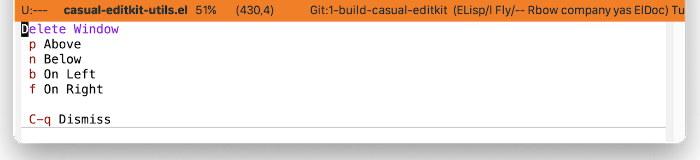
Window Menu Unicode Symbol Support 
If the variable casual-lib-use-unicode is set to t, then Unicode symbols are used in the labels.
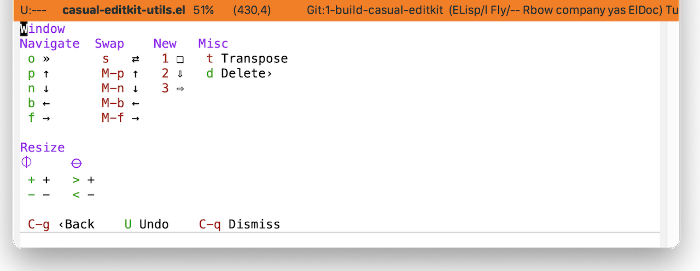
For more info on using Unicode symbols, please refer to UX Conventions.