5.3.1 Bookmarks Install 
Simplified Install 
If Casual is installed using package-install, then you can use casual-init to setup support for Bookmarks.
By default, casual-init will setup support for Bookmarks via the hook function casual-bookmarks-init which is included in the customizable variable casual-init-hook.
Use the command customize-variable on casual-init-hook to control inclusion of casual-bookmarks-init via a checkbox interface.
Refer to the Simplified Install (Install) section for more detail on customizing casual-init.
Casual makes opinionated decisions on the keybindings used in its menus. Such opinions are extended from said menus to the keymap(s) of a particular mode. For Bookmarks, this can be controlled via the customizable variable casual-bookmarks-add-extra-keybindings (default t).
Hook Install 
Users who want a more granular install of Casual modules can invoke the hook function of interest in their Emacs initialization file.
(casual-bookmarks-init)
Manual Install 
For users who have manually installed Casual outside of package-install, the following guidance is offered.
The primary interface for Casual Bookmarks is the Transient menu casual-bookmarks-tmenu. It is autoloaded ((elisp)Autoload) so if Casual is installed via package-install ((emacs)Package Installation) then casual-bookmarks-tmenu can be invoked via execute-extended-command (M-x) without need for modifying your Emacs initialization file.
That said, Casual is designed with the intent of using a common (key)binding across multiple modes to lower cognitive load. This document uses the binding C-o for this purpose, but can be changed to user preference.
There are many ways to configure this binding. Shown below is a straightforward implementation:
(require 'casual-bookmarks) ; load all dependencies including `bookmark'
(keymap-set bookmark-bmenu-mode-map "C-o" #'casual-bookmarks-tmenu)
If lazy loading of the bookmark package is desired then try using eval-after-load:
(eval-after-load 'bookmark
  (keymap-set bookmark-bmenu-mode-map "C-o" #'casual-bookmarks-tmenu))
Additional Bindings 
Use this keybinding to configure the bookmark list to be consistent with keybindings used by Casual Bookmarks.
(keymap-set bookmark-bmenu-mode-map "J" #'bookmark-jump)
Casual Bookmarks also includes the keymap casual-bookmarks-main-menu which inserts a Bookmarks menu into the main menu bar as shown below.
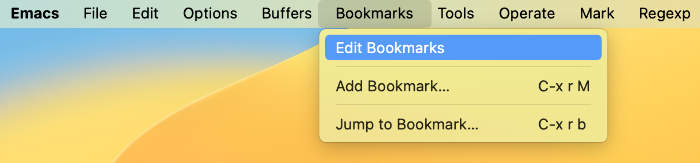
To enable this, add the following configuration to your initialization file.
(require 'casual-bookmarks)
(easy-menu-add-item global-map '(menu-bar)
                    casual-bookmarks-main-menu
                    "Tools")
While not necessary, having the current bookmark highlighted is convenient. Enable hl-line-mode for the bookmark list as shown below.
(require 'hl-line)
(add-hook 'bookmark-bmenu-mode-hook #'hl-line-mode)
Finally, customize the variable bookmark-save-flag to the value 1 to ensure that your bookmark changes are always saved.
The above guidance largely extends the work done in the blog post Using Bookmarks in Emacs like you do in Web Browsers.