4 Commands 
The primary interface for now-playing.el is the Transient menu now-playing-tmenu. It can be invoked via execute-extended-command M-x.
Listed below are commands to both control or get current information from the Music app.
- now-playing-tmenu
Transient menu for now-playing.el.
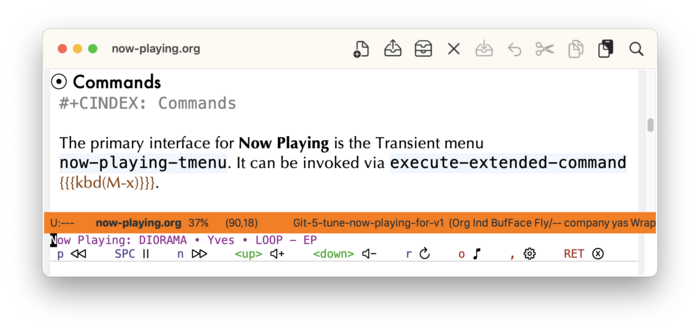
The following commands are provided:
- Pause/Play (
SPC) - Previous (
p) and Next (n) Track - Open (launch) Music app (
o) - Increase (
<up>) and Decrease (<down>) volume - Refresh current track (
r) - Settings (
,)
- Pause/Play (
- now-playing-set-state
- now-playing-play
-
Note if there is no current track, this AppleScript command will not succeed. If this occurs, switch to the Music app to directly select a track to play.
- now-playing-pause
- now-playing-playpause
Toggle play or pause Music app.
Note if there is no current track, this AppleScript command will not succeed. If this occurs, switch to the Music app to directly select a track to play.
- now-playing-stop
-
Note this command will deselect the current track in the Music app, making the commands
now-playing-playandnow-playing-playpauseineffective. If this occurs, switch to the Music app and select a track to resume expected behavior. - now-playing-next-track
-
Note if this command is called when on the last track of the playlist or album will deselect the current track.
- now-playing-previous-track
-
Note if this command is called when on the first track of the playlist or album will deselect the current track.
- now-playing-get-volume
- now-playing-set-volume
- now-playing-increase-volume
- now-playing-decrease-volume
- now-playing-current-track
- now-playing-launch-music
Command Variables 
The following customizable variables can be changed to preference:
- now-playing-volume-delta
- now-playing-dismiss-menu-for-playpause
If non-nil, then toggling pause/play will dismiss the Transient menu
now-playing-tmenu.- now-playing-menu-theme
-
Customize this variable to a theme of preference:
- SF Symbols (
:sfsymbols) - Unicode (
:unicode) - Text (
:text)
Both Unicode and Text allow for usage on TTY frames on systems that do not support SF Symbols.
- SF Symbols (