5.24.2.3 Org List 
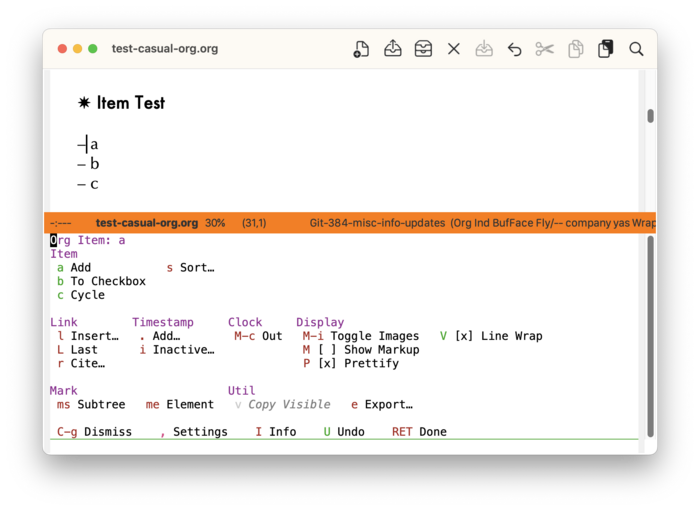
When the point is in a list item (org#Plain Lists), the following list-related commands are displayed in casual-org-tmenu:
- a Add
Inserts a list item.
- b To Checkbox
Converts a list item to a checkbox.
- c Cycle
Changes the list style from a cycle of styles.
- s Sort
Sorts the list given user-specified criteria.
If the point is at the very start of the list, then then certain commands like “b To Checkbox” will affect all items in the list.
Checkbox 
When an item is converted to a checkbox, the heading of the section changes from “Item” to “Checkbox”. The following two commands are added:
- C-c Toggle
Toggle the checkbox from an unchecked (
[ ]) to a checked ([X]) state or vice-versa.- - In Progress
Change a checkbox from an unchecked (
[ ]) to an in-progress ([-]) state. Use the “C-c Toggle” command to reset from the in-progress state.
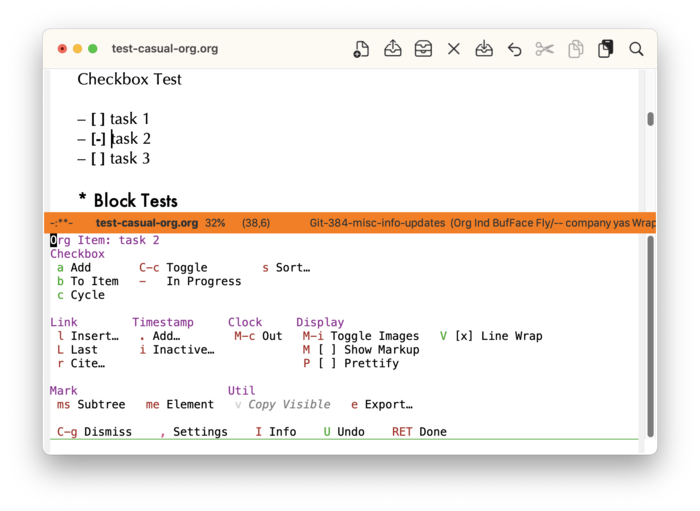
Use the “b To Item” command to revert a checkbox back to a plain item.