5.20.2 I-Search Usage 
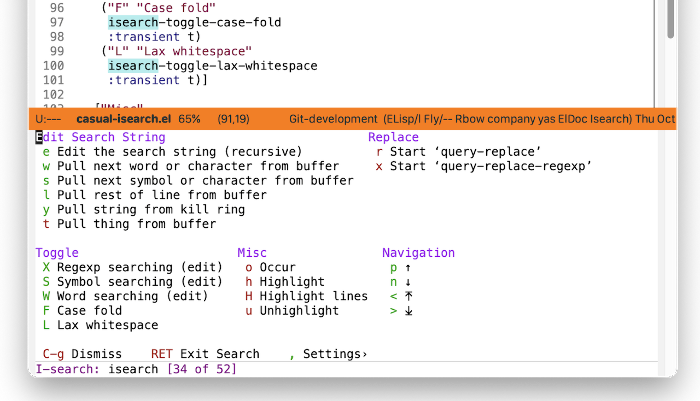
The main menu for Casual I-Search is organized into the following sections:
- Edit Search String
Commands to edit the search string. The type/extent of the string (word, symbol, line, thing) can be specified here.
- Replace
Invoke
query-replaceorquery-replace-regexpon matched strings.- Toggle
Commands to configure the type of search. Toggling any menu item in this section will dismiss the Transient menu and return you back to the I-Search minibuffer prompt.
- Misc
Miscellaneous commands. From here the search string can be fed into
occuror be highlighted.- Navigation
Navigation commands for matched strings.
When in search mode (typically via the keybinding C-s or C-r), pressing the keybinding C-o (or binding of your preference) will raise the Transient menu casual-isearch-tmenu. Once raised, only the I-Search commands in the Toggle, Replace, and Misc sections will automatically dismiss the menu when selected. All other I-Search commands will not dismiss the menu.
Use C-g to dismiss this Transient menu.
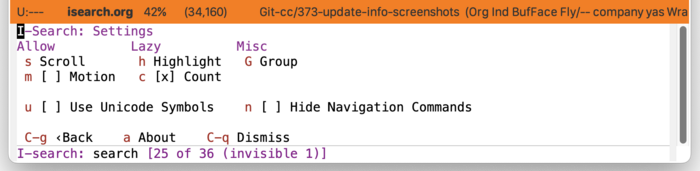
I-Search Settings 
The menu casual-isearch-settings-tmenu provides access to different I-Search settings.
I-Search Unicode Symbol Support 
By enabling “u Use Unicode Symbols” from the Settings menu, Casual I-Search will use Unicode symbols as appropriate in its menus.
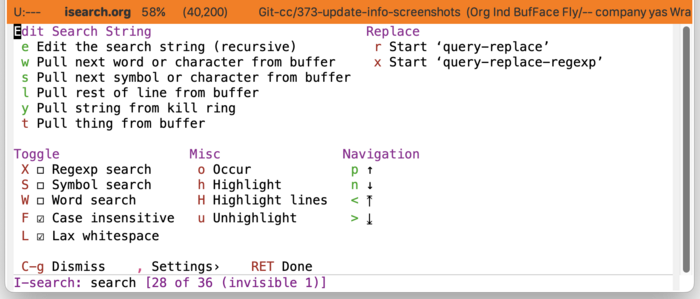
For more info on using Unicode symbols, please refer to UX Conventions.