5.13.2 Eshell Usage 
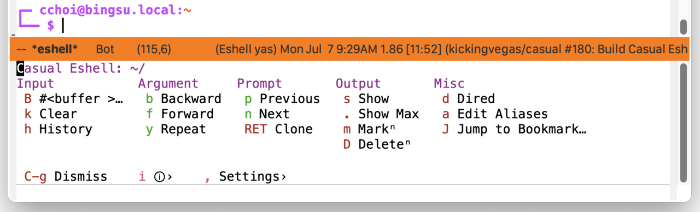
Eshell can be invoked via M-x eshell. In the Eshell window, press C-o (or your binding of preference) to raise the menu casual-eshell-tmenu.
The following sections are offered in the menu:
- Input
Commands supporting input to the current prompt.
- Argument
Commands supporting arguments in the current prompt.
- Prompt
Navigation of previous prompt commands.
- Output
Commands related to display of prompt. Commands marked with the glyph ✦ support an optional prefix (C-u) value.
- Misc
Miscellaneous commands.
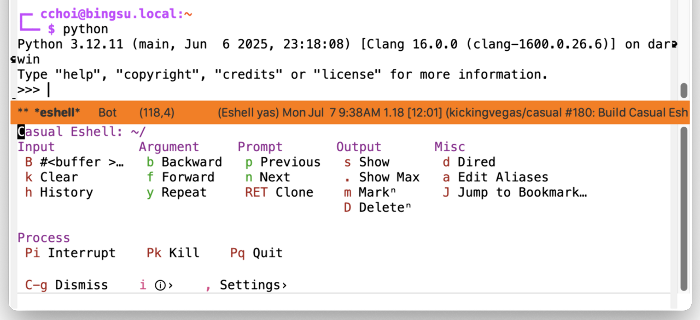
- Process
Signal commands to send to the process. This section is only visible when a process is running.
Eshell Settings 
The menu casual-eshell-settings-tmenu provides access to different eshell-mode settings.
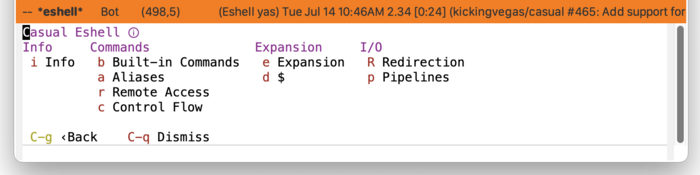
Eshell Info 
The menu casual-eshell-info-tmenu provides access to different eshell-mode documentation in its Info manual.
Eshell Unicode Symbol Support 
By enabling “u Use Unicode Symbols” from the Settings menu, Casual Eshell will use Unicode symbols as appropriate in its menus.
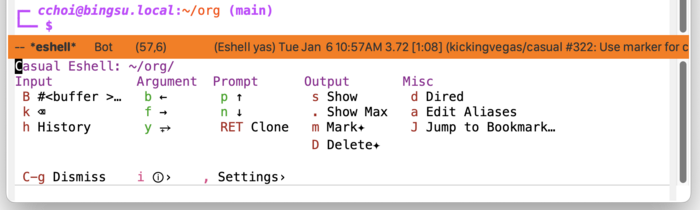
For more info on using Unicode symbols, please refer to UX Conventions.