4 Usage 
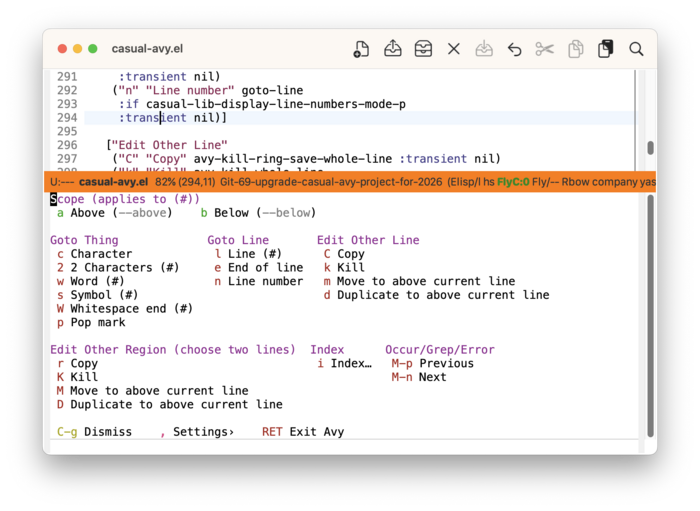
Invoke the Casual Avy menu (casual-avy-tmenu) with the keybinding casual-avy-keybinding (default M-g).
The menu is grouped into the following sections:
- Scope — Set scope for Avy command to apply to either above or below the current point.
- Goto Thing — Navigate to text thing.
- Goto Line — Navigate to a line.
- Edit Other Line — Line-based Avy editing commands.
- Edit Other Region — Region-based Avy editing commands.
- Index — Imenu and index-related commands.
- Occur/Grep/Error — Navigation commands for Occur, Grep, or Error.
Avy editing commands allow for editing a different line or region while keeping the point stationary. The following glossary details the meaning of the menu labels under the Edit sections.
- Copy
Copies the selected object (line, region) into the kill ring.
- Kill
Kills the selected object into the kill ring.
- Move to above current line
Moves the selected object to the line above the current point.
- Duplicate to above current line
Duplicates the selected object to the line above the current point.