2.3.6 Text Menu Features 
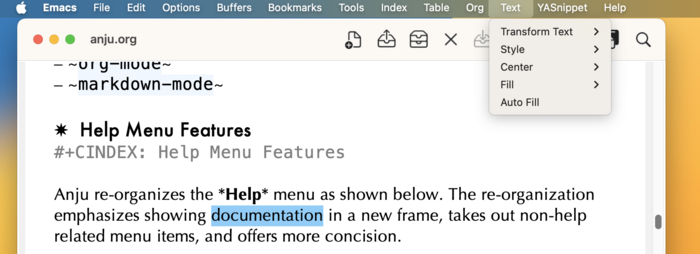
If the major mode of the current buffer is derived from text-mode, then a Text menu is displayed in the menu bar.
The menu hierarchy of the Text menu is described below with the actual command shown in parenthesis next to its label.
- Transform Text (
anju-transform-text-menu)- Make Upper Case (
upcase-region) - Make Lower Case (
downcase-region) - Capitalize (
capitalize-region)
- Make Upper Case (
- Style (
anju-style-menu)- Bold (
anju-style-bold) - Italic (
anju-style-italic) - Code (
anju-style-code) - Underline (
anju-style-underline) - Verbatim (
anju-style-verbatim) - Strike Through (
anju-style-strike-through) - Remove (
anju-style-remove)
- Bold (
- Center (
anju-center-text-menu)- Line (
center-line) - Region (
center-region) - Paragraph (
center-paragraph)
- Line (
- Fill (
anju-fill-text-menu)- Paragraph (
fill-paragraph) - Paragraph ⤶ (
fill-paragraph-semlf) (Only Emacs 31.1+) - Unfill Paragraph (
unfill-paragraph) - Region (
fill-region) - Region as paragraph (
fill-region-as-paragraph) - Region as paragraph ⤶ (
fill-region-as-paragraph-semlf) (Only Emacs 31.1+) - Individual paragraphs (
fill-individual-paragraphs) - Non-uniform paragraphs (
fill-nonuniform-paragraphs)
- Paragraph (
- Auto Fill (
toggle-text-mode-auto-fill)
Note the Style menu is visible only for Org and Markdown modes.
This modification is optional. For more detail, see Text Menu Customization.