2.1 Mode Line 
The following mode line enhancements are provided by Anju:
Pop-up Buffer List 
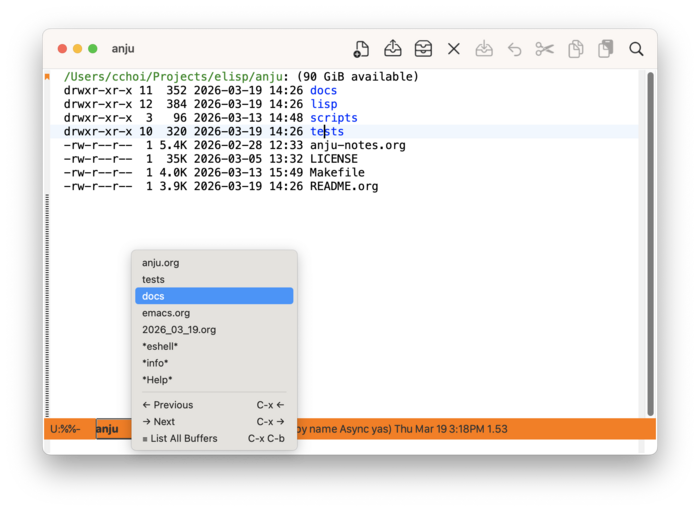
On the mode line, left-click (mouse-1) on the buffer name to raise a pop-up menu containing a list of open buffers. The contents of this list is controlled by the customizable variable anju-buffer-list-filter-functions. More info on customizing the buffer list menu can be found in Mode Line Buffer List Menu Customization.
Window Management 
A right-click (mouse-3) on any blank space on the mode line will pop-up a window management menu.
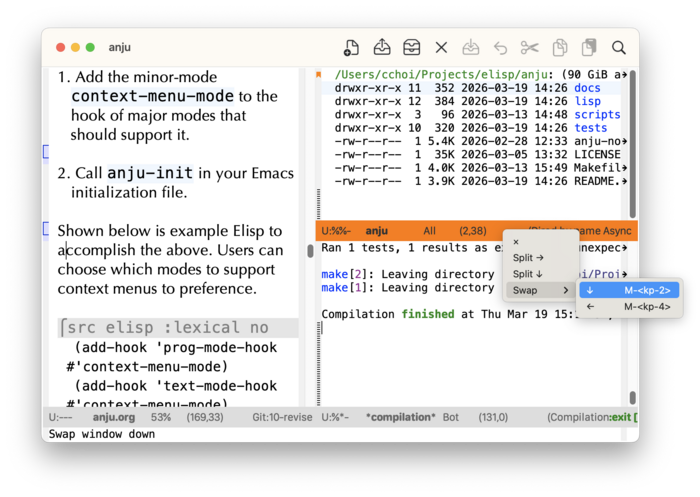
From here, one can:
- Delete the window (×)
- Split the window horizontally (→)
- Split the window vertically (↓)
- If multiple windows are shown, swap the current window.
Note: usage of “window” refers to the Emacs definition of it. Refer to emacs#Frames for more detail on this.
Toggle Maximize Window 
A left-double-click on any blank space on the mode line will checkpoint the current window configuration, then maximize the current window (delete-other-windows). Re-doing the left-double-click will restore the prior window configuration.